Wednesday, June 19, 2013

JDBC statements in Java

Hi All,

Welcome to Java-recent

In this post we will discuss about different connection statements used in JDBC.
There are primarily three types of connection statements:-
  1. Statement
  2. PreparedStatement
  3. CallableStatement

Lets discuss each one of them in detail
Statement interface :- is used to query database from Java,it provides different methods like executeQuery(), executeUpdate() etc.
  • Resultset executeQuery(String) :- is used to execute SQL SELECT queries,returns ResultSet.
  •  Int executeUpdate(String) :- is used to execute SQL(INSERT,UPDATE,DELETE) queries,returns int value indicating number of rows affected
  • boolean execute(String) :- returns true if a resultSet is retrieved successfully, generally used to execute DML statements
  • Statement query gets compiled and executed every time when it is called
  • It is used in case where there is no repetition of a query
Syntax :- statement.executeQuery("select mail from COMPANY where name="+"'"+uName+"'");

PreparedStatement interface :-
  • Prepared statement queries are precompiled and the fetch plan will be stored in cache,so for subsequent requests only execution will happen
  • They are faster than Statement queries because Statement queries will get compiled every time
  • Used in case there is repetition of a query
  • Prepared statements can be parameterized,parameterization of query values is done by using '?' - place holder in setXXX() method
  • Prepared Statement prevents SQL injection
    For detailed explanation on SQL injection with example refer SQL injection
Syntax :-There are two ways of using prepared statement
1.PreparedStatement preparedStatement = connection.prepareStatement("select * from COMPANY where sid="+"'"+emailId+"'");

2. PreparedStatement preparedStatement = connection.prepareStatement("select * from COMPANY where sid=? AND name=?");
preparedStatement.setInt(1, 101);
preparedStatement.setString(2, "Google");

setXXX() -- takes two parameters first one tells position of the value to be placed,
this starts from 1 .
Second parameter is the respective value to be passed for ?-place holder

The first type of declaration will not prevent SQL injections because we are hard coding the where clause with a variable.
Second type of declaration will prevent SQL injection because all the parameters passed will be escaped by JDBC


CallableStatement :-
  • is an interface used to execute stored procedures
  • There are three types of parameters for a stored procedure
    • IN :- used to provide input to stored procedure,this is set by using setXXX()
    • OUT :- is used to hold values from a procedure,this is retrieved using getXXX()
    • INOUT :- acts as both input and output parameters

Code snippets :-

Procedure

create or replace procedure "P_COMPANY" (pname IN VARCHAR2, pemailid OUT VARCHAR2)
is begin
select mail into pemailid from COMPANY where name=pname;
end;

Procedure P_COMPANY takes two parameters and select query put  the  mail Id into pemailid(OUT parameter)

//CallableStatement usage
1 CallableStatement cs = connection.prepareCall("{call P_COMPANY(?,?)}");
2 cs.setString(1, name);
3 cs.registerOutParameter(2, java.sql.Types.VARCHAR);
4 cs.execute();
5 String mailId = cs.getString(2);
  • Line 1 we are calling the the procedure P_COMPANY
  • setting the IN parameter using setString(1, name);
  • registering OUT parameter ,we have to mention sql data type also
  • execute() or executeQuery() or executeUpdate() can be used to execute the procedure
  • Line 5 getting the output from pemailid OUT variable
Complete code
JDBCConnection.java

public class JDBCConnection {
public void connectDB(String name) throws ClassNotFoundException,
SQLException {
Connection connection = null;
;
CallableStatement cs = null;
try {
Class.forName("oracle.jdbc.driver.OracleDriver");

// Creating connection object
connection = DriverManager.getConnection(
"jdbc:oracle:thin:@localhost:1521:xe", "system", "admin");

cs = connection.prepareCall("{call P_COMPANY(?,?)}");
cs.setString(1, name);
cs.registerOutParameter(2, java.sql.Types.VARCHAR);
cs.execute();
String mailId = cs.getString(2);

System.out.println("Required Mail id" + mailId);

} finally {
try {
connection.close();
cs.close();
} catch (SQLException e) {
// TODO Auto-generated catch block
e.printStackTrace();
}
}
}

public static void main(String[] args) {
JDBCConnection jdbc = new JDBCConnection();
try {
jdbc.connectDB("Yahoo");

} catch (ClassNotFoundException e) {
// TODO Auto-generated catch block
e.printStackTrace();
} catch (SQLException e) {
// TODO Auto-generated catch block
e.printStackTrace();
}
}

}


Output :- Required Mail id yahoo@yahoo.com


Key Points :-
  • Statement is used for non-repeating queries
  • Prepared Statement will be pre-compiled,on subsequent requests the query will get executes
  • Action/Execution plan is stored in cache which helps in faster execution
  • Prepared Statements will prevent SQL injections
  • Prepared Statements allows parameterization of values by using place holder [?]
  • Procedure can be executed using callable interface
  • IN parameter is set using setXXX()
  • OUT parameter is retrived by first registering the parameter and using getXXX()


                          Happy Learning

Please provide your valuable comments on this article and share it across your network.


SQL injection in Java-JDBC

Hi All,

Welcome to Java-recent.

In this post we will discuss about SQL injection and its security threats with an example.

SQL injection :-
  • means injecting unwanted/undesired sql statements into our application queries,which will result unexpected behavior or pose security threats like displaying data that is not supposed to be shown to end user etc.
  • This happens in data driven web applications irrespective of technology used(Java,.Net,PHP etc)
  • SQL injection attack(SQLA) is considered one of the top 10 vulnerabilities from 2007- 2010

There are primarily 3-4 ways of implementing SQLA.
  • Incorrectly filtered escape characters
    • Passing escape characters to application query for example from a form input field
      Ex:- SELECT mail FROM COMPANY WHERE name = '' OR 1=1 -- -' AND id = '';
  This type of query may get formed due to sql injection
  • Providing comments like – - ,/* in middle of the query which will comment out rest of the query
          Will show live implementation by an example
  • Incorrect type handling
    • Passing different data type values to the query,this will happen in cases where we retrieve request parameter directly and place in the query which helps in passing escape characters to query

  • Blind SQL injection
    • Blind SQL Injection is used when a web application is vulnerable to an SQL injection but the results of the injection are not visible to the attacker
Example :- Suppose we have a request URL as below http://localhost:8083/AjaxExample/DesignNumeric?name=Google

The request parameter can be modified by a hacker to know the information about data base server or can run unwanted queries which can fetch undesired data. This type of injection causes performance issues also,sometimes there may be a fault query which may take more time and consume application resources

For detailed info on SQL injection refer SQL injection

Here I will explain about incorrectly filtered escape characters with an example

Applications/Software used for below example
  • Orcale as database
  • Eclipse IDE
  • Apache Tomcat 7
  • ojdbc14.jar for connecting to Oracle DB from Java
  • Table Name :- COMPANY
      SNO
    • NAME
      MAIL
      1
    • Google
    • google@gmail.com
      2
    • Yahoo
    • yahoo@yahoo.com
      3
    • Microsoft
    • microsoft@live.com
  • Connection String :-jdbc:oracle:thin:@localhost:1521:xe","system","admin"
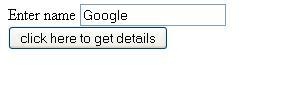
  • Html page :- Submit.html takes user name as input
  • Servlet :- Design.java used to connect to database and print the Email Id of the user submitted in the Submit.html page
Source code :-

Submit.html
<form action="Design">
Enter name <input name="name"><br>
<input type="submit" value="click here to get details"
</form>

Design.java :-
@WebServlet("/Design")
public class Design extends HttpServlet {
private static final long serialVersionUID = 1L;

protected void doGet(HttpServletRequest request, HttpServletResponse response) throws ServletException, IOException {
String uName=request.getParameter("name");
Connection conn=null;
try {
Class.forName("oracle.jdbc.driver.OracleDriver");
//Creating connection object
conn=DriverManager.getConnection("jdbc:oracle:thin:@localhost:1521:xe","system","admin");
Statement statement=conn.createStatement();
ResultSet rs= statement.executeQuery("select mail from COMPANY where name="+"'"+uName+"'");//Executing query
//Printing Resultset data
PrintWriter out=response.getWriter();
out.println("<head><body>");
while(rs.next())
{
String emailID= rs.getString("MAIL");//column name in COMPANY table
out.println("<h4>"+emailID+"</h4><br>");
}
out.println("</body></head>");
}catch (ClassNotFoundException e1) {
// TODO Auto-generated catch block
e1.printStackTrace();
}
catch (SQLException e) {
// TODO Auto-generated catch block
e.printStackTrace();
}
finally
{
try {
conn.close();
} catch (SQLException e) {
// TODO Auto-generated catch block
e.printStackTrace();
}
}
}
}


Explanation :-

  • In Design.Java servlet we are connecting to data base and fetching mail Id of the user name entered in Submit.html page
  • request.getParameter("name");
    • Is used to get value of the name entered in text box
  • statement.executeQuery("select mail from COMPANY where name="+"'"+uName+"'");
    • The above statement processes the query and stores data in ResultSet

Scenario1:-
  • User enters Google in the Submit.html

  • The resultant query that gets generated is
    select mail from COMPANY where name='Google',
  • This will give expected output as google@gmail.com
Now lets see the Scenario where SQL injection happens

Scenario 2 :-
  • User now enters input which has special characters like ' OR '1'='1 in the text box

  • The query that gets generated is select mail from COMPANY where name=' ' OR '1'='1'
  • Here in the where clause user has used '1'='1' which will always be true,so what will be output of below query? It will print all the mailId's,which is a pure security issue by posing unrelated info to the end user

google@gmail.com


yahoo@yahoo.com


microsoft@live.com

Clearly we have seen how a hacker can get unintended information,there are many ways to minimize or stop SQL attacks. Needs a detailed post for them,so will explain in my coming posts. A brief note about them is below
  • Setting access permissions on DB system tables,view etc.
  • Using PreparedStatement, parametrization of query values
  • Parsing/filtering escape characters
  • Exact type checking before passing value to a query

Happy Learning

Please provide your valuable comments on this article and share it across your network.


Monday, June 17, 2013

Reading/Writing data from/to excel sheets(.XLSX) using Java

Hi,
Welcome to Java-recent.

In this post we will discuss about reading and writing content to Excel documents(.xlsx).
Reading/Writing from .xls is discussed in my previous post @http://java-recent.blogspot.in/2013/06/readingwriting-data-fromto-excel.html

Prerequisites :-
  • Apache-poi jars
    The latest version jars can be downloaded from http://poi.apache.org/
  • A Java development IDE like Eclipse etc.
  • Configure the downloaded jars in the build-path of IDE
The main classes involved in reading/writing contents to excel(.xls) file are
  • XSSFWorkbook
  • FileInputStream
  • FileOutputStream
First we will see how to read content from .xlsx file

Reading data from .xlsx :-

1 public void readXLSX() throws IOException {
2 FileInputStream fis = new FileInputStream("F:\\xlsxRead.xlsx");
3 XSSFWorkbook xlsxBook = new XSSFWorkbook(fis);
4 XSSFSheet sheet = xlsxBook.getSheetAt(0);
5 Iterator<Row> rowIterate = sheet.iterator();
6 while (rowIterate.hasNext()) {
7 Row currentRow = rowIterate.next();
8 Iterator<Cell> cellIterate = currentRow.cellIterator();
9 while (cellIterate.hasNext()) {
10 Cell currentcell = cellIterate.next();
11 System.out.println(currentcell.getStringCellValue());
12 }
13 }

14 }

Explanation:-
  • Line 2 creating FileInputStream object with F:\\xlsxRead.xlsx as file path
  • Line 3 passing fis to XSSFWorkbook object
  • Line 4 getting sheet at location zero means first sheet
  • Line 6-12.iterating over rows and retrieving cell values
  • cellIterator(); is used to iterate over cells
  • If there are different type of cell values like numeric,comments etc. we use switch-case statements and differentiate accordingly
Now lets see writing content to .xlsx file

Writing content to .xlsx file :-

1 public void writeXLSX() throws IOException {
2 String str[][] = new String[2][3];
3 str[0][0] = "SNo";
4 str[0][1] = "Name";
5 str[0][2] = "EmailId";
6 str[1][0] = "1";
7 str[1][1] = "Java-recent";
8 str[1][2] = "sudheer@javarecent.com";
9
10 FileOutputStream fos = new FileOutputStream("F:\\xlsxRead.xlsx");
11
12 XSSFWorkbook xlsxBook = new XSSFWorkbook();
13 XSSFSheet sheet = xlsxBook.createSheet("sheet1");
14 try {
15 for (int rowCount = 0; rowCount < 2; rowCount++) {
16 //creating a row
17 XSSFRow myRow = sheet.createRow(rowCount);
18
19 for (int cellIndex = 0; cellIndex < 3; cellIndex+ +) {
20 XSSFCell myCell = myRow.createCell(cellIndex);
21 myCell.setCellValue(str[rowCount][cellIndex]);
22 }

23 }
// Writing to a fileoutput
24 xlsxBook.write(fos);
25 } finally {
26 fos.flush();
27 fos.close();
28 }
29 }

Explanation :-
  • Line no 2 to 8 created a two dimensional array for storing values to be inserted into excel with row size 2 and column size 3
  • Line 10 created FileoutputStream and passed F:\\xlsxRead.xlsx file location
  • Line 11 and 12 created XSSFWorkbook and XSSFSheet sheet of name sheet1
  • Line no 15 to 22 is used to write values,there are two for loops,outer loop for creating row and inner loop for creating cell and inserting values
  • XSSFCell myCell = myRow.createCell(cellIndex); is used to create cell
  • myCell.setCellValue(str[rowCount][cellIndex]); is used to insert value to cell
  • Line 24 is used to write excel content to the file
  • finally block is used to cleanup the resources,From Java 7 no need to explicitly write finally block


main method which calls the above methods and handle exceptions :-
public static void main(String[] args) {
XLSXReadWrite xrw = new XLSXReadWrite();
try {
xrw.readXLSX();
xrw.writeXLSX();
} catch (IOException e) {
// TODO Auto-generated catch block
e.printStackTrace();
}
}


For more details on formatting cells etc .refer @  http://poi.apache.org/


Happy Learning

Please provide your valuable comments on this article and share it across your network.


Like and Share