Showing posts with label jdbc. Show all posts

Tuesday, August 6, 2013

Implementing Custom converters in Java Server Faces(JSF)

Custom converters :-
Java Server Faces provides set of standard converters but in some cases we need to implement our own converters.
We want to be date in a particular format or emailId should be of specific format etc.
We can implement this by using java script but if java script is disabled? So its always recommended to perform server side validations.

Steps to be followed for creating custom converters :-
  1. Create a Java class
  2. Implement javax.faces.convert.Converter
  3. Override the unimplemented methods getAsObject(FacesContext,UIComponent,String),getAsString(FacesContext,UIComponent,String)
Example :-

public class CustomConverter implements Converter {

@Override
public Object getAsObject(FacesContext arg0, UIComponent arg1, String arg2)
throws ConverterException {
// TODO Auto-generated method stub
return null;
}

@Override
public String getAsString(FacesContext arg0, UIComponent arg1, Object arg2)
throws ConverterException {
// TODO Auto-generated method stub
return null;
}

}


As we get data from web page in form of String all the conversion
is done in getAsObject();

4.Registering custom converter class in faces-config.xml
<converter>
<description>Removes white spaces in the input</description>
<display-name></display-name>
<converter-id>cc</converter-id>
<converter-class>CustomConverter</converter-class>
</converter>

This can be done by component tab in faces-config.xml instead of writing the above lines.

The above converter can be implemented by using
1.Converter attribute :-
<h:inputText id="number" value="#{loginBean.num}" converter="cc">
</h:inputText>

  1. Using Converter tag nested inside the component tag
<h:inputText id="number" value="#{loginBean.num}">
<f:converter id="cc"/>
</h:inputText>


Happy Learning

Please provide your valuable comments on this article and share it across your network.


Sunday, August 4, 2013

Passing values to methods in Java-Primitives and Objects

In this post we will discuss about how method calling ,value passing happens in Java.

1.Passing Object reference variables to a method :-
  • when we pass an object to a method we are not actually passing object itself, we are passing object reference
  • Reference variable holds the address location of object and a way to load into memory
  • We are not passing actual reference variable,but a copy of reference variable-which holds the copy of bits present in actual value

Lets see below code snippent

Employee emp1=new Employee();
method1(emp1);
void method1(Employee emp)
{
}
Here both emp1 and emp point to same Employee Object in heap.

Example1 :-

public class ObjectReference {
private int var1;
private int var2;

public ObjectReference(int x, int y) {
var1 = x;
var2 = y;
}

public static void main(String[] args) {
ObjectReference op = new ObjectReference(5, 10);
System.out.println("before modify " + op.var1 + "&&" + op.var2);
op.modify(op);
System.out.println("after modify " + op.var1 + "&&" + op.var2);
}

void modify(ObjectReference pop) {
pop.var1 = pop.var1 + 10;
pop.var2 = pop.var2 + 10;
System.out.println("in modify " + pop.var1 + "&&" + pop.var2);
}
}


Output :-
before modify 5&&10
in modify 15&&20
after modify 15&&20

Here both op and pop reference variables are referring to same ObjectReference object .If one reference variable tries to change the value autotically it gets reflected to another varaible.

In the above example in change method we changed the value of var1 and var2 and when we print the value in main method it got reflected.
Now lets see what happens in case of primitive data types.

2.Passing primitive variables to a method :-
When we are passing primitive values to a method we are actually passing copy of bits that represent a value.Suppose we have int a=5,when we pass a to a method we are actually passing copy of bits of value 5. For this we use a terminology passbyvalue rather its passbycopyofvalue .

Example :-
public class PrimitivePass {
int a = 10;

public static void main(String[] args) {
PrimitivePass pp = new PrimitivePass();
System.out.println("Before change" + pp.a);
pp.change(pp.a);
System.out.println("After change" + pp.a);
}

void change(int pNum) {
pNum = pNum + 10;
System.out.println("in change" + pNum);
}
}

output :-
Before change10
in change20
After change10

From the output we can observe that value of a is not changed ,but in previous case we observed for object references the value has changed.

Note :-
  • While passing an Object we actually pass copy of the object reference
  • While passing a primitive type we pass the bits value stored in that variable
  • In both the cases we send copy of bits,in primitives actual value is stored but in case of Object reference it stores the address of the object

Happy Learning

Please provide your valuable comments on this article and share it across your network.


Saturday, July 27, 2013

Basic Annotations in Java Persistence API(JPA)

Hi,

Today we will discuss some of the basic JPA annotations.

Annotations :-
  • @Table
  • @Column
  • @Temporal
  • @Transient

Lets consider below table -Company

    SNO
  • NAME
    MAIL
    1
  • Google
  • google@gmail.com
    2
  • Yahoo
  • yahoo@yahoo.com
    3
  • Microsoft
  • microsoft@live.com

1.@Table :-is used to map your entity java bean with the table
In general your table name and entity bean will have same name at that time there is no need to use @Table
If the Entity bean is different from the table name we map it by using @Table annotation

Example :-
Lets take the above table-Company ,but my entity bean name is named as Organization  then we can use @Table to map them

@Entity
@Table(name="Company")
Public class Organization{.......}


2.@Column :- is used to map an instance variable with a column in a table
If the variable name and database column name is same ,then there is no need to use column
This is similar to @Table

Example :-
Lets take the data base column -Name in the above table
In Entity bean we have companyName.so how to map them?

@Column(name="Name")
Private String companyName;

3.@Temporal :-
  • In Java we have java.util.Date and java.util.Calendar classes,if we wnat to persist them into data base we should use @Temporal
  • Temporal are set of time based types
Example :-
@Temporal(TemporalType.DATE)
Date currentDate;

In Entity                                                                   Mapped to data base
  • TemporalType.DATE
  • Mapped to java.sql.Date
  • TemporalType.TIME
  • Mapped to java.sql.Time
  • TemporalType.TIMESTAMP
  • Mapped to java.sql.Timestamp

4.@Transient :-
  • Attributes that are part of Entity but should not be persisted should be marked as @Transient
  • Suppose we have a attribute lastName and should not be persisted to data base,we use@Transient
Example :-
@Transient
private String lastName;

There are many annotations in JPA,each one of them has special functionality which i will discuss in my later posts


Happy Learning

Please provide your valuable comments on this article and share it across your network.


Thursday, July 4, 2013

Introduction to Entity beans in Java Persistence API (JPA)

Hi All,

In this post we will discuss about Java Persistence API(JPA) entity bean.

Lets have a brief introduction about JPA.
JPA is a Java data base framework which eases interaction with database by providing following features
  1. Java Persistence Query language (JPQL)
  2. Object relational mapping
  3. Providing annotation etc.
The most important aspect in JPA is a Java bean class .
Bean in Java is a simple class with properties and their getter and setter methods

In JPA we call this bean with a special name called as Entity.

Entity Bean :- is an exact replica of a table in a database,it is independent of database used.
  • The mapping between a Entity Bean and data base table is configured in persistence.xml file
  • There are different types of annotations(@) which helps in representing primary keys,table name etc.
  • Annotation are in simple metadata(Data about Data),they give extra information to compiler
  • A normal Java bean can be converted into a Entity by using @Entity annotation
we will discuss more about annotations in upcoming posts.

In this post we will see how to write a Entity Bean

Environment used :-
  • Eclipse Juno
  • Oracle
  • JPA 2.0 jars
Lets have below COMPANY table in data base

    SNO
  • NAME
    MAIL
    1
  • Google
  • google@gmail.com
    2
  • Yahoo
  • yahoo@yahoo.com
    3
  • Microsoft
  • microsoft@live.com

Now we will write a Entity class for the same. In Eclipse its simple to create most of the required code will be auto generated.
  1. Switch to JPA perspective in Eclipse
  2. Configure data base connection by using Data Source Explorer view(window-->Show view-->Data Source Explorer)
  3. Create a JPA project(File—New-->Create JPA project)
  4. Open the project,in JPA content you will find persistence.xml file
  5. Now select the project click on new-->others--JPA Entity from tables
  6. Select the data base connection , schema configured in step 2 and select tables that you want to generate Entities
  7. Click the check box-- update in persistence.xml
  8. Select a primary key generator type like Auto etc(Not mandatory) continue and click finish
Lets see the code that gets generated for COMPANY table


@Entity
public class Company implements Serializable {
private static final long serialVersionUID = 1L;

@Id
private BigDecimal sno;
private String mail;
private String name;
public Company() {
}

public String getMail() {
return this.mail;
}

public void setMail(String mail) {
this.mail = mail;
}

public String getName() {
return this.name;
}

public void setName(String name) {
this.name = name;
}

public BigDecimal getSno() {
return this.sno;
}

public void setSno(BigDecimal sno) {
this.sno = sno;
}

}


Explanation :-

Here we need to take a look at two annotations

  1. @Entity :- Gives a identification for a normal Java bean as entity
  2. @Id :- Indicates the primary key in the table

Here we have three properties and their getter and setter methods,we will be accessing (setting/retrieving )the properties by using these methods.

There are lot more annotations available for various purposes will explain in details in my upcoming posts.

Now have a look at persistence.xml, we will find the Entity class added.

                         Happy Learning

Please provide your valuable comments on this article and share it across your network.


Thursday, June 20, 2013

Prepared Statement-Preventing SQL injections

Hi All,

Welcome to Java-recent.

In this post we will discuss about Prepared Statement-used to execute sql queries from Java.

Lets get into more details.

Prepared Statement :-
  • is an interface from java.sql.PreparedStatement
  • is used to execute queries,set values in a query
  • Prepared statement queries are precompiled and the fetch plan will be stored in cache,so for subsequent requests only execution will happen
  • They are faster than Statement queries because Statement queries will get compiled every time
  • Used in case there is repetetion of a query
  • Prepared statements can be parameterized,parameterization of query values is done by using '?' - place holder in setXXX() method
  • Prepared Statement prevents SQL injection
Syntax :-There are two ways of using prepared statement
1.PreparedStatement preparedStatement = connection.prepareStatement("select * from COMPANY where sid="+"'"+emailId+"'");

2. PreparedStatement preparedStatement = connection.prepareStatement("select * from COMPANY where sid=? AND name=?");
preparedStatement.setInt(1, 101);
preparedStatement.setString(2, "Google");

setXXX() -- takes two parameters first one tells position of the value to be placed,
this starts from 1 .
Second parameter is the respective value to be passed for ?-place holder

The first type of declaration will not prevent SQL injections because we are hardcoding the where clause with a variable.
Second type of declaration will prevent SQL inection because all the parameters passed will be escaped by JDBC

Example Code:- There is a webpage which takes user name as input and pass it into servlet
Servlet retrives emailId as per user name from DB

Design.java
@WebServlet("/Design")
public class Design extends HttpServlet {
private static final long serialVersionUID = 1L;

protected void doGet(HttpServletRequest request, HttpServletResponse response) throws ServletException, IOException {
String uName=request.getParameter("name");
Connection conn=null;
try {
Class.forName("oracle.jdbc.driver.OracleDriver");
//Creating connection object
conn=DriverManager.getConnection("jdbc:oracle:thin:@localhost:1521:xe","system","admin");
String query="select mail from COMPANY where name="+"'"+uName+"'";
PreparedStatement statement =conn.prepareStatement("select mail from COMPANY where name=?1");
statement.setString(1, uName);
System.out.println("query--------"+query);
ResultSet rs= statement.executeQuery(); //Executing query
//List ls=(List) rs;
//System.out.println(ls);
PrintWriter out=response.getWriter();
out.println("<head><body>");
while(rs.next())
{
String emailID= rs.getString("MAIL");
out.println("<h4>"+emailID+"</h4><br>");
}
out.println("</body></head>");
}catch (ClassNotFoundException e1) {
// TODO Auto-generated catch block
e1.printStackTrace();
}
catch (SQLException e) {
// TODO Auto-generated catch block
e.printStackTrace();
}
finally
{
try {
conn.close();
} catch (SQLException e) {
// TODO Auto-generated catch block
e.printStackTrace();
}
}
}
Submit.html
<form action="Design">
Enter name <input name="name"/><br/>
<input type="submit" value="click here to get details"/>

</form>


Here we have used place holder for passing values '?'
conn.prepareStatement("select mail from COMPANY where name=?1");
statement.setString(1, uName);
Case1 :- when we enter value as Google in the form and submit


we will get output as google@gmail.com

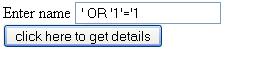
Case2 :- Now we will provide some special characters in the form as
' OR '1'='1


Now the resultset will be empty,because the statement ResultSet rs= PreparedStatement.executeQuery(); will remove the escape characters. So unlike in previous post SQLinjection it will not return entire results.


Happy Learning

Please provide your valuable comments on this article and share it across your network.


Like and Share